
The console and power buttons of a game server
Reading the server log, sending commands, and when to use Start, Restart, Stop and Kill.
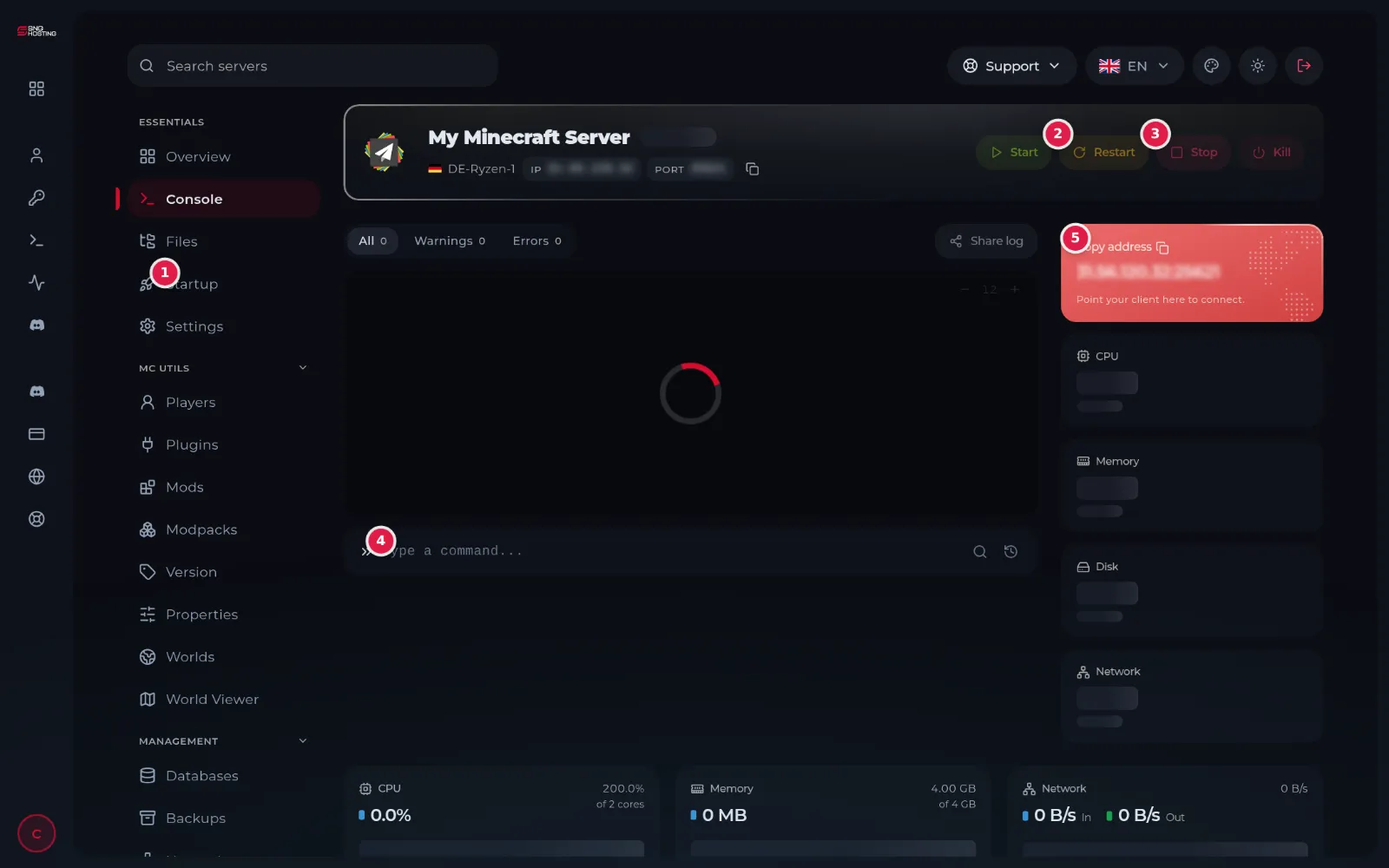
The Console page is the first thing the game panel opens: the live server log, the power buttons and resource usage.
- 1Step 1
The power buttons
Start (1) starts the server. Restart (2) stops and starts it; players are disconnected for a moment. Stop (3) shuts it down safely after saving the world. Kill stops it at once without saving.
 Note
Use Kill only when the server is stuck on Stopping. It can lose changes that were not saved yet.
- 2Step 2
Read the log
The log shows what the server is doing as it happens. The Warnings and Errors tabs show only warnings and errors, which is the quickest way to find the cause of a problem.
- 3Step 3
Send a command
Type the command in the Type a command box (4) and press Enter. The commands are the game's own, for example say hello in Minecraft.
- 4Step 4
Watch the usage
On the right and at the bottom of the page you see CPU, memory, disk and network usage against your plan's limits.
Notes
- If memory stays close to the limit, the server needs a bigger plan.
- Share log makes a link to the log that you can send to support instead of a screenshot.
Steps didn't work for you? Our support team is available around the clock.