
Servers5 minutes
Install MariaDB on Windows
Setting up database for FiveM servers and games
MariaDB is the faster, better alternative to MySQL. Follow these steps to install it correctly.
- 1Step 1
Download MariaDB
Go to the official MariaDB website and download the latest Stable version for Windows (MSI Package).
- 2Step 2
Start Installation
Run the installer. Accept terms and click Next.
- 3Step 3
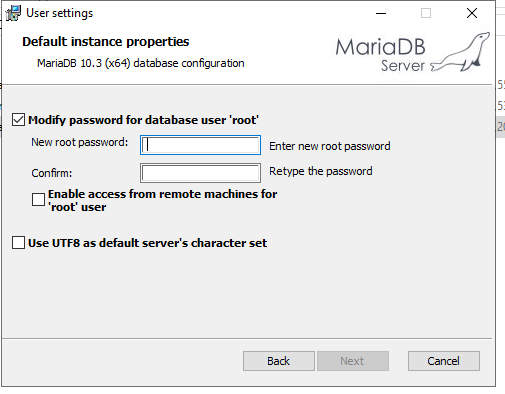
Root Password Setup
You will be asked to set a password for the root user. Choose a strong password and remember it (you'll need it for server.cfg).
- 4Step 4
Default Settings
Leave other settings as default (Service Name: MySQL, TCP Port: 3306). Click Next then Install.
- 5Step 5
HeidiSQL Installation
HeidiSQL is usually installed automatically with MariaDB. Use it to manage your databases easily.
Need help?
Contact supportSteps didn't work for you? Our support team is available around the clock.