
Servers3 minutes
Change RDP Port
Change default RDP port 3389 for better security
Achtung
WARNING: Ensure you open the new port in the Firewall BEFORE applying changes, otherwise you will lose access!
- 1Schritt 1
Open Registry Editor
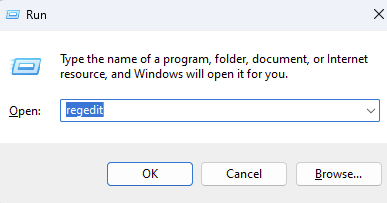
Press Win + R, type 'regedit', and press Enter.
- 2Schritt 2
Navigate to Path
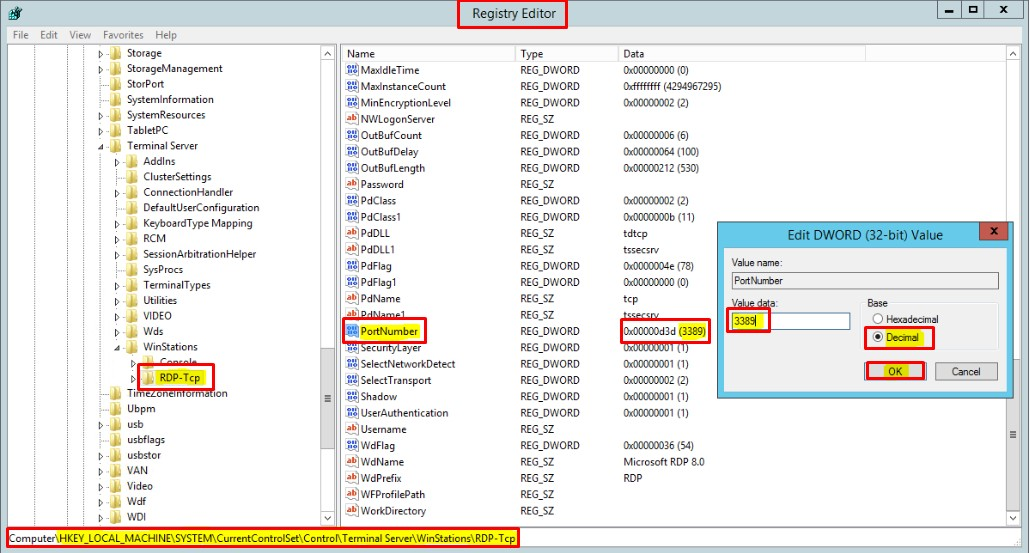
Go to the following path:
HKEY_LOCAL_MACHINE\System\CurrentControlSet\Control\Terminal Server\WinStations\RDP-Tcp - 3Schritt 3
Edit PortNumber
Find 'PortNumber' key. Double click it, select 'Decimal', and enter the new port (e.g., 5000).
- 4Schritt 4
Open Port in Firewall
Open Windows Defender Firewall with Advanced Security. Create a new Inbound Rule for the new port (TCP).
- 5Schritt 5
Restart
Restart Remote Desktop Services or the entire server.
Brauchst du Hilfe?
Support kontaktierenDie Schritte haben nicht geholfen? Unser Support-Team ist rund um die Uhr da.