
Linux Server10 minutes
Install FiveM Server on Linux
Guide to setting up a FiveM server using txAdmin on Ubuntu
- 1Schritt 1
Update System & Install Prerequisites
Update your system and install necessary tools like git, wget, and xz-utils.
sudo apt update && sudo apt upgrade -y sudo apt install xz-utils git wget -y - 2Schritt 2
Create Server Directory
Create a dedicated directory for your server files.
mkdir -p ~/fivem/server cd ~/fivem/server - 3Schritt 3
Download Artifacts
Download the latest server artifacts from the official FiveM website. Replace the link below with the latest one.
wget https://runtime.fivem.net/artifacts/fivem/build_proot_linux/master/7294-12403697a5538356943806026823528828352328/fx.tar.xz - 4Schritt 4
Extract Files
Extract the downloaded archive.
tar xf fx.tar.xz rm fx.tar.xz - 5Schritt 5
Start Server
Now start the server using the run.sh script. Make sure to run this inside a screen or tmux session.
./run.sh - 6Schritt 6
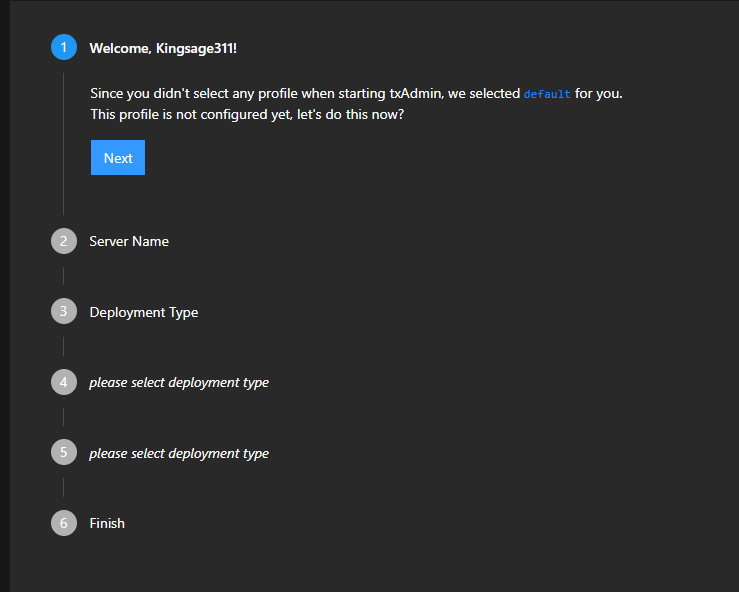
Setup txAdmin
Upon starting, you will see a PIN code and a URL. Open the URL in your browser and enter the code to complete setup.
- 7Schritt 7
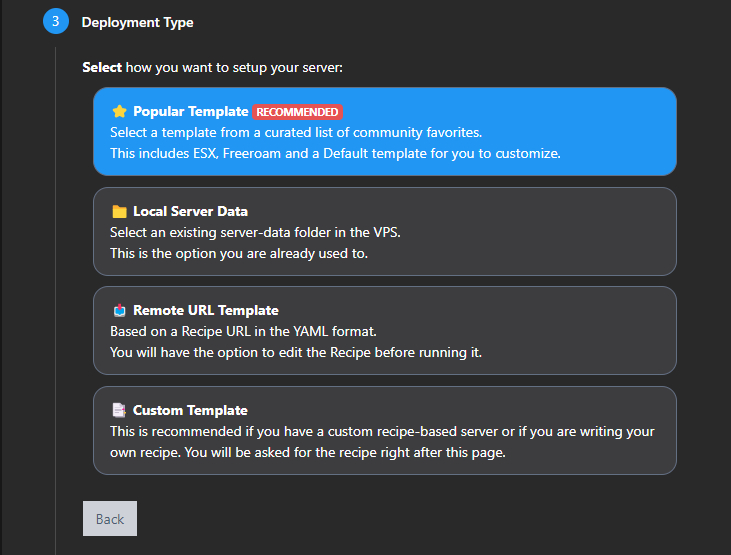
Complete Installation
Follow the txAdmin steps: Select 'Popular Template' then 'ESX' or 'QBCore'.
Brauchst du Hilfe?
Support kontaktierenDie Schritte haben nicht geholfen? Unser Support-Team ist rund um die Uhr da.